

 AlexxIT
Block recvonly media tracks
On a AD410 doorbell (unsure about others) when you use go2rtc to simply view the camera it also starts a recvonly stream if they exist so the microphone can talk to teh doorbell. The issue though is while this is fantastic, it also poses a functional problem with the doorbell. When the track is selected, it completely disables the doorbell BUTTON as it thinks a call to the doorbell is underway.
This means I cannot view the doorbell, send video to remote devices (pipup, etc) without completely disabling the doorbell button. I generally have motion triggering video on my Google Hubs/TVs for example.
This severely limits go2rtc with doorbells. Is there a way to tell go2rtc to NOT attempt to connect on recvonly audio? I've tried many approaches including modifying the webrtc.html files. If I view a stream on VLC directly, the doorbell button continues to function correctly.
Any advice or enhancement? I don't believe this is fixable by configuration only. Maybe a parameter/filter to pass?
[
  {
    "media:0": "video, sendonly, 26 JPEG/90000",
    "media:1": "audio, sendonly, 0 PCMU/8000",
    "media:2": "audio, recvonly, 8 PCMA/8000",
    "receive": 689716,
    "remote_addr": "10.100.1.143:554",
    "send": 104580,
    "track:0": "8 PCMA/8000, sinks=0",
    "type": "RTSP client producer",
    "url": "rtsp://10.100.1.143:554/cam/realmonitor?channel=1\u0026subtype=1\u0026authbasic=64/"
  },
  {
    "receive": 695520,
    "remote_addr": "udp4 host 10.100.1.130:55984",
    "send": 688900,
    "type": "WebRTC server consumer",
    "user_agent": "Mozilla/5.0 (X11; Linux x86_64) AppleWebKit/537.36 (KHTML, like Gecko) Chrome/103.0.0.0 Safari/537.36"
  }
]

Oh wow, my partner mentioned the doorbell button wasn't working and I figured it was just bugged again, but that makes a lot of sense.
I imagine this could potentially affect other devices with backchannel audio as well.


That appears to work. I just needed to now create a new camera definition for calls (backchannel enabled) that I can use to activate the mic/calls instead.

As fast solution, add
#backchannel=0to RTSP link in config.
Just to mention, this seems only applicable to ffmpeg streams but not to plain RTSP URLs:
ffmpeg:rtsp://admin:[email protected]/cam/realmonitor?channel=1&subtype=1&unicast=true&proto=Onvif#video=copy#audio=copy#backchannel=0
The above works. But the below doesn't:
rtsp://admin:[email protected]/cam/realmonitor?channel=1&subtype=1&unicast=true&proto=Onvif#backchannel=0

As fast solution, add
#backchannel=0to RTSP link in config.Just to mention, this seems only applicable to
ffmpegstreams but not to plain RTSP URLs:ffmpeg:rtsp://admin:[email protected]/cam/realmonitor?channel=1&subtype=1&unicast=true&proto=Onvif#video=copy#audio=copy#backchannel=0The above works. But the below doesn't:
rtsp://admin:[email protected]/cam/realmonitor?channel=1&subtype=1&unicast=true&proto=Onvif#backchannel=0
I don't think ffmpeg streams support back channel?
Also it definitely worked for me on the base rtsp urls (no ffmpeg) with the ad410 doorbell
I don't think ffmpeg streams support back channel?
Maybe that's why it works. :D
But anyway, when I use the plain RTSP with backchannel=0, this is what info shows:
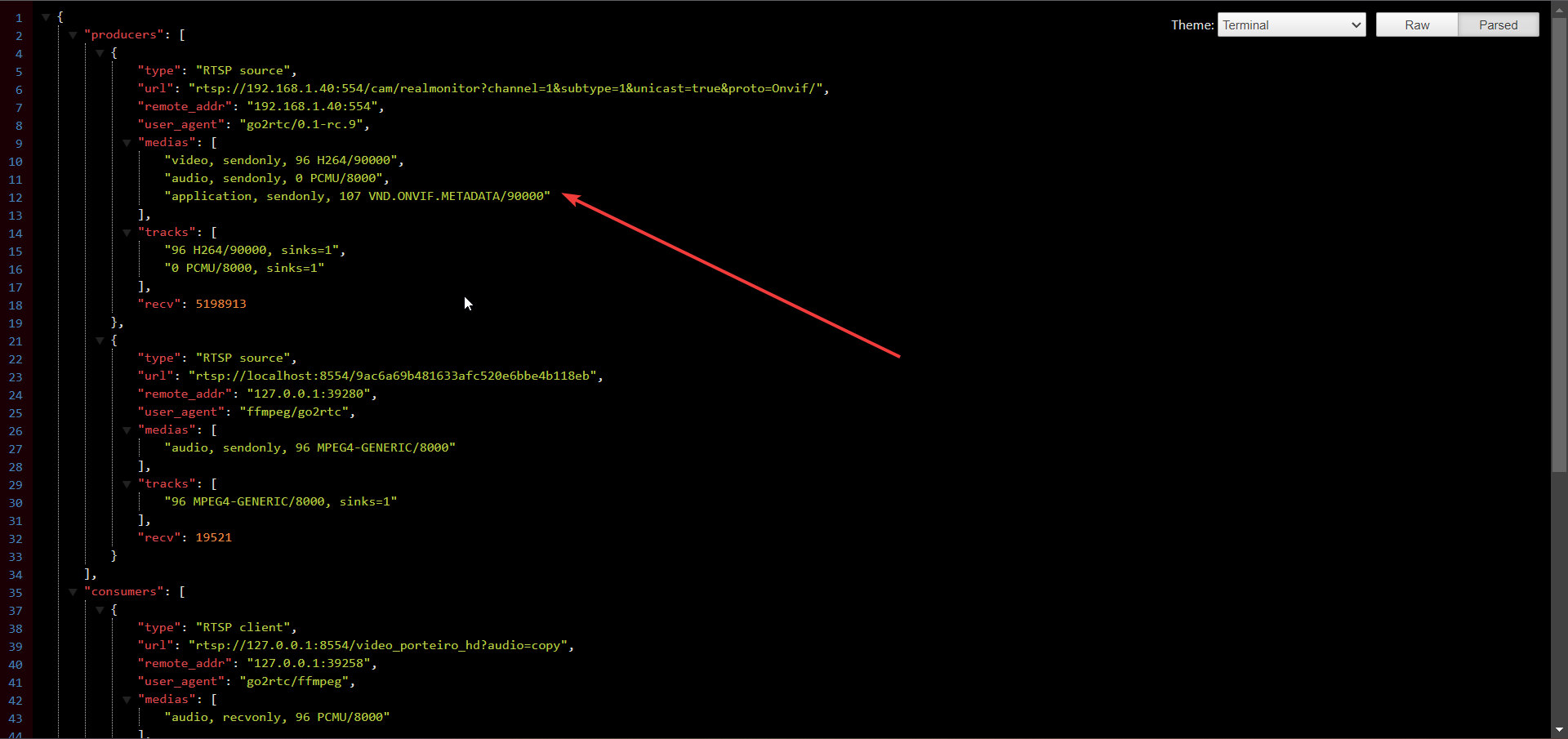
Which appears to indicate that backchannel is there.
While when using ffmpeg:
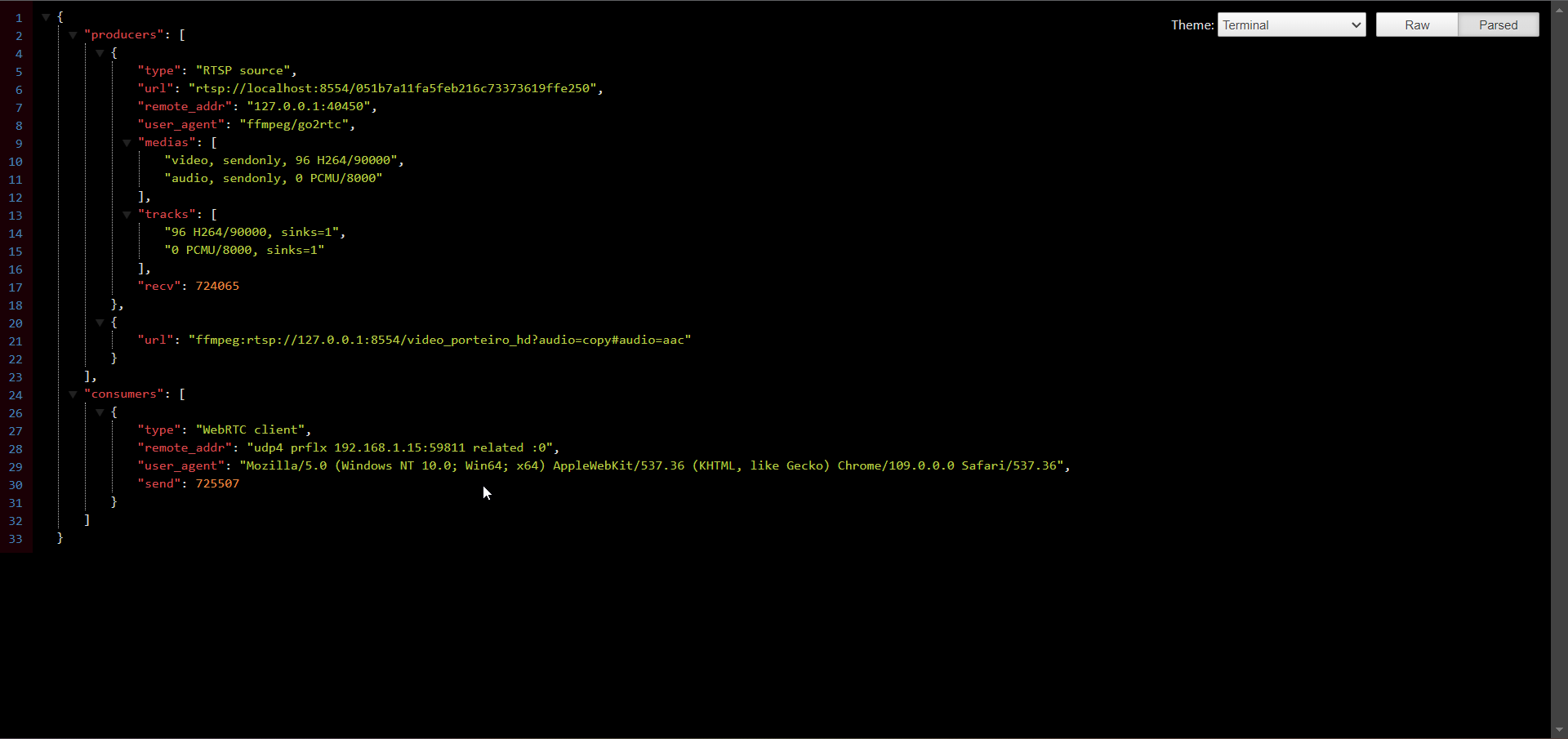
Never mind, it's working as expected. https://github.com/blakeblackshear/frigate/discussions/5156#discussioncomment-4762455