

 AlexxIT
ERROR: No video
Hey all, I have added a Hikvision camera added it to my dashboard using webrtc custom component and it works for few seconds only. I can see the stream but after few seconds i get ERROR; No video. There is nothing in logs even though i got debug logging. Any thoughts?
With VLC rstp stream is stable so that's not the network problem and HAAS is in the same subnet as ip cam.
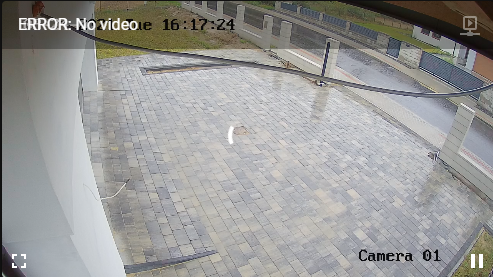

I'm having the same issue.
On Tue, Aug 24, 2021, 10:20 AM kaczkalolo @.***> wrote:
Hey all, I have added a Hikvision camera added it to my dashboard using webrtc custom component and it works for few seconds only. I can see the stream but after few seconds i get ERROR; No video. There is nothing in logs even though i got debug logging. Any thoughts?
[image: image] https://user-images.githubusercontent.com/47222608/130633665-57831794-c175-4133-85ec-955c88326f51.png
— You are receiving this because you are subscribed to this thread. Reply to this email directly, view it on GitHub https://github.com/AlexxIT/WebRTC/issues/118, or unsubscribe https://github.com/notifications/unsubscribe-auth/AENNBYGJRCVZDNOH3UZQ6SLT6OTEJANCNFSM5CW6NACA . Triage notifications on the go with GitHub Mobile for iOS https://apps.apple.com/app/apple-store/id1477376905?ct=notification-email&mt=8&pt=524675 or Android https://play.google.com/store/apps/details?id=com.github.android&utm_campaign=notification-email .

After a several hours i get the same error on my Wall mounted Ipad. Restart browser and it works again for hours :-(

No video means that your camera sends very rare keyframes. If there is no keyframe within 10 seconds, the component will drop the connection to the camera

It mostly shows up after around 5sec i get to that dashboard... Can i be because of high resolution? 4MPX and 8MPX? Or is it on all Hikvision cameras? In Hikvision app everything is ok and fluent but in webrtc it just doesn't work :(
This is my main stream config:
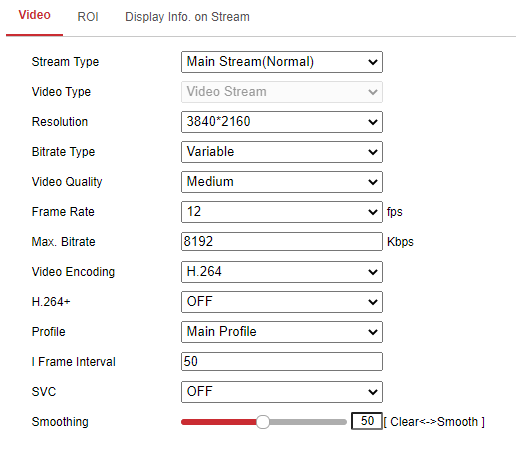
50/12 = 4+ seconds. It is better to use ~2 seconds key frames. There may be rare skips in key frames
So what would be the best value for Frame Interval then? I've changed it to 2 but then quality dropped a lot- it just sucks now. Also when i turn on H264+, which is on by default, that field frame interval is greyed out and i can't change it. H264+ saves me lots of disk space so it would be nice to have it on.
Ok now i don't have that error but that wheel icon keeps showing up like every second so that live view is kinda shuttered... When i change that interval to 2 then video is fluent but quality is horrible. Any other chnage i could make?
Check my new project. Maybe it handle this situation https://github.com/AlexxIT/go2rtc