

 AcademySoftwareFoundation
Add/modify submitter
Not exactly a bug. I would like to know the best practice way to add a new (what would be the correct terminology) submitter for arbitrary tools, i.e. Houdini or Modo.

I'll give some initial info on this, but let me know if you need any further assistance or I can clarify anything further.
If you do end up creating a new submission tool, we'd be very interested in merging it into the main OpenCue codebase if you're willing!
There are a couple of approaches you could take here.
1. Use CueSubmit
The existing CueSubmit tool could be adapted with a connector for whatever application you want to use.
One thing to note here is that dependency conflicts are pretty common, especially the Qt/PySide dependency that CueSubmit uses. Often the applications are shipped with built-in dependencies that can't be easily changed, and are often outdated, which CueSubmit isn't compatible with. Given that, there are a couple of sub-approaches here.
1a. Built in directly
Load CueSubmit's dependencies and CueSubmit itself into the application's environment directly.
https://github.com/AcademySoftwareFoundation/OpenCue/blob/master/cuesubmit/plugins/maya/CueMayaSubmit.py is an example of this.
This only works if CueSubmit's dependencies are compatible with whatever is built into the application.
1b. Launched via an external process
Launch a version of CueSubmit as an external process in its own environment, passing some info to it via commandline flags to prepopulate whatever you need.
This is essentially a two-step process:
- Create a new version of the submission application, e.g. https://github.com/AcademySoftwareFoundation/OpenCue/blob/master/cuesubmit/plugins/nuke/CueNukeSubmit.py
- Add a control (button, menu item, etc.) to the application which launches the new submission application, e.g. https://github.com/AcademySoftwareFoundation/OpenCue/blob/master/cuesubmit/plugins/nuke/CueNukeSubmitLauncher.py
2. Create a new tool
Basically, create a new tool from scratch that integrates into the application in a more native way.
This would require using our pyoutline library to construct a job definition and send it to your Cuebot.
CueSubmit can still be helpful here as an example of how to do that. For example: https://github.com/AcademySoftwareFoundation/OpenCue/blob/master/cuesubmit/cuesubmit/Submission.py
See buildLayer on how to use pyoutline to construct a job layer, and submitJob on how to send the job to Cuebot.

Thanks @bcipriano for the insight. I'm aware of dependency mismatches when working an applications environment. Apologies for not being specific enough... I was just wondering how to add arbitrary tools to the Job Type drop down menu
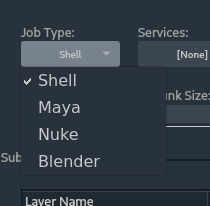
It seems this is all Java and I'm only Python savvy :( Anyhow, once I get the time to dig a bit deeper into the architecture of OpenCue, I might come back here in case I get stuck. Take care!
We are currently adopting OpenCue in our studio and this is one of the improvements we will soon propose to the project (making sure the code is solid before submitting to review/discussion). The approach is to be able to declare any job type from the cuesubmit_config.yaml file and populate the UI accordingly. Having to touch the code to declare a new job type is currently a big bottleneck for adoption. You have to :
- declare a new jobType
- load it in the constants
- build a widget
- make a command builder
Whereas modifying the yaml is straightforward and has little to no friction :) We are currently making it work with :
- providing command flags
- providing a custom python script that gets inspected
- nesting a config file per job type More to come real soon.
