

 AUTOMATIC1111
[Bug]: Torch cannot run GPU
Is there an existing issue for this?
- [X] I have searched the existing issues and checked the recent builds/commits
What happened?
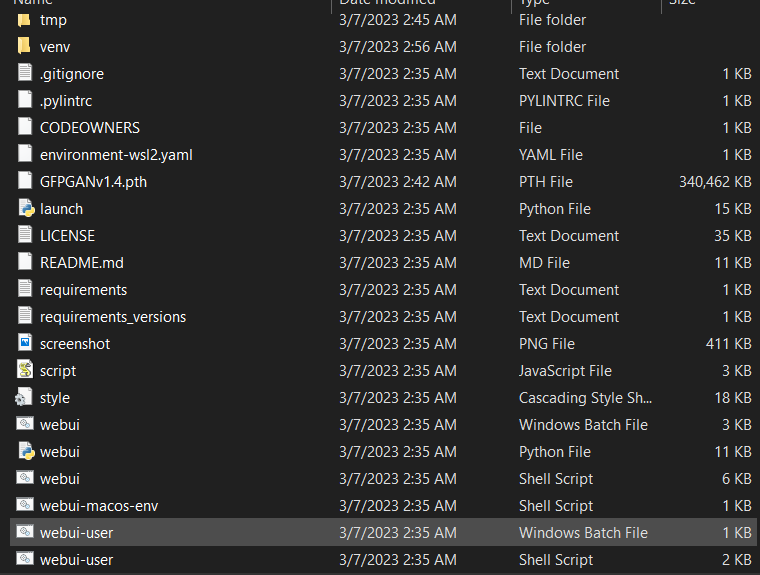
I clicked WebUi-user.bat in my files and it opened the console interface as expected and when it finished downloading, it said my GPU is unable to run Torch. I'm not a computer whiz so it doesn't quite make sense to me, please help.
Steps to reproduce the problem
What should have happened?
It should give the prompt "Running on local URL: http://127.0.0.1:7860
To create a public link, set share=True in launch()" upon completion.
Commit where the problem happens
Unsure, as mentioned above I'm not knowledgeable of the subject.
What platforms do you use to access the UI ?
Windows
What browsers do you use to access the UI ?
Microsoft Edge
Command Line Arguments
No.
List of extensions
No.
Console logs
venv "C:\Users\spagh\Downloads\stable-diffusion-webui-master\stable-diffusion-webui-master\venv\Scripts\Python.exe"
Python 3.10.6 (tags/v3.10.6:9c7b4bd, Aug  1 2022, 21:53:49) [MSC v.1932 64 bit (AMD64)]
Commit hash: <none>
Traceback (most recent call last):
  File "C:\Users\spagh\Downloads\stable-diffusion-webui-master\stable-diffusion-webui-master\launch.py", line 360, in <module>
    prepare_environment()
  File "C:\Users\spagh\Downloads\stable-diffusion-webui-master\stable-diffusion-webui-master\launch.py", line 272, in prepare_environment
    run_python("import torch; assert torch.cuda.is_available(), 'Torch is not able to use GPU; add --skip-torch-cuda-test to COMMANDLINE_ARGS variable to disable this check'")
  File "C:\Users\spagh\Downloads\stable-diffusion-webui-master\stable-diffusion-webui-master\launch.py", line 129, in run_python
    return run(f'"{python}" -c "{code}"', desc, errdesc)
  File "C:\Users\spagh\Downloads\stable-diffusion-webui-master\stable-diffusion-webui-master\launch.py", line 105, in run
    raise RuntimeError(message)
RuntimeError: Error running command.
Command: "C:\Users\spagh\Downloads\stable-diffusion-webui-master\stable-diffusion-webui-master\venv\Scripts\python.exe" -c "import torch; assert torch.cuda.is_available(), 'Torch is not able to use GPU; add --skip-torch-cuda-test to COMMANDLINE_ARGS variable to disable this check'"
Error code: 1
stdout: <empty>
stderr: Traceback (most recent call last):
  File "<string>", line 1, in <module>
AssertionError: Torch is not able to use GPU; add --skip-torch-cuda-test to COMMANDLINE_ARGS variable to disable this check
Additional information
I have 16gb of RAM and 10gb VRAM, running on windows 10 on MSI. AMD 5000 series. Python 3.10.6. I found a similar post about this same issue, but I appear to have slightly different hardware. It said "you might need to use an older version of torch to get it to work right, go double check any dependencies for your torch/python/drivers, python: 3.8.6 • torch: 1.12.1+cu113 works for me". I don't understand this lol, but it might be related to the problem.

It looks like your python environment isn't set up properly, have you run auto111 before? Or is this your initial installation? It's possibly an issue with conflicting python installs, do you have both pip and python in your PATH? Also what version of windows, python, and pip are you using? If you have python 3.10.6 installed properly and enabled the "add to PATH" option during installation, you might solve the issue by right clicking in the main directory (where webui-user.bat is stored) opening a command - prompt, and running py pip install -r requirements.txt that may allow you to run it properly

It looks like your python environment isn't set up properly, have you run auto111 before? Or is this your initial installation? It's possibly an issue with conflicting python installs, do you have both pip and python in your PATH? Also what version of windows, python, and pip are you using? If you have python 3.10.6 installed properly and enabled the "add to PATH" option during installation, you might solve the issue by right clicking in the main directory (where webui-user.bat is stored) opening a command - prompt, and running py pip install -r requirements.txt that may allow you to run it properly
This is first time running auto1111. I'm running version 3.10.6 of python. I'm using this site as reference for directions https://www.howtogeek.com/832491/how-to-run-stable-diffusion-locally-with-a-gui-on-windows/#autotoc_anchor_3 And yes I added it to PATH, and pip is also added I'm on windows 10.
When you open a command prompt and type "py" what output do you get?
Does it recognize python? One thing that can dick up the installation is if you accidentally installed the newest version of python, then uninstalled it. You can have multiple instances of python installed at a time and it can cause some annoying issues if it's not organized properly.
Is the launch.py file where the console output points to in your PC? It looks like you've got a stablediffusionwebuimaster folder inside a folder by the same name, did you accidentally make a second webui inside the first?
Honestly the easiest solution might be to just delete the entire directory, install git and run git clone https://github.com/AUTOMATIC1111/stable-diffusion-webui
This guide you posted looks a bit outdated. The guide on the main page of the GitHub is the easiest way to do it, much less involved and places to make a mistake, pretty sure it downloads the initial models for you and everything. I'll copy paste it for you here
Automatic Installation on Windows Install Python 3.10.6, checking "Add Python to PATH"
Install git.
Download the stable-diffusion-webui repository, for example by running git clone https://github.com/AUTOMATIC1111/stable-diffusion-webui.git.
Run webui-user.bat from Windows Explorer as normal, non-administrator, user.
Ah, got it. I'll take a look at it and I find no luck I'll comment here again lol. Thank you for your help
No worries! I know it's a wall, especially because it t advances so fast that things from a month ago are already outdated. Git is the easiest way to go, updating once it's installed is as complicated as pasting git pull https://github.com/AUTOMATIC1111/stable-diffusion-webui.git , less so i even if you add that line to webuiuser.bat
Well, I'm here now: Applying cross attention optimization (InvokeAI). Textual inversion embeddings loaded(0): Model loaded in 10.8s (calculate hash: 4.8s, load weights from disk: 0.1s, load config: 0.2s, create model: 3.9s, apply weights to model: 0.9s, apply half(): 0.8s). Running on local URL: http://127.0.0.1:7860
To create a public link, set share=True in launch().
I've entered it as a URL. Am... Am I done? Was that it?
It takes around 4 minutes for each image to generate or longer. Is that normal? When opening webuiuserbat it says somewhere in the code that i dont have nvidia so it "proceeds without it". Is it not using AMD?
Have you read this?: https://github.com/AUTOMATIC1111/stable-diffusion-webui/wiki/Install-and-Run-on-AMD-GPUs

Alright I think I finally got it. It still wasn't using the GPU at all. It would throw all the processing into the CPU and that's why it was running slow. Fixed.
@FancyFoxo what steps did you take to have this use the GPU rather than the CPU? I've got an NVDIA GPU, but an AMD cpu and i'm seeing the Torch is not able to use GPU error
Thanks!
