ADefWebserver
A database operation failed while processing a request. Apply existing migrations for ApplicationDbContext may resolve the issue.
Hi Michael,
I cloned this project from github and followed the instructions in the README.
- Add a Database to my SqlServer SyncfusionHelpDesk
- Run the script which adds two tables and the indexes.
- Added the connection string to my local SqlServer with the Default Catalog as SyncfusionHelpDesk to appsettings.json I also got a license from Syncfusion for version 18.1.0.42 and added the Licensing component and System.IO to my Startup with a ref the the license file, read the file and Register the license. I am using Visual Studio 16.9.1 preview. With it I have successfully compiled and run the SyncfusionDemoApp for Blazor. I have also worked with two other Blazor apps with Syncfusion (latest 18.3.0.51 I think)
I am getting a database migration error when I run the app.
It is pretty annoying because I do not care about user identity at this point in my development. I will probably rip out the auth and use something else when I get into user auth. Right now, I just want to be able to write and read tickets to get a feel for how the Syncfusion controls work.
Attached is a picture of the migration error.
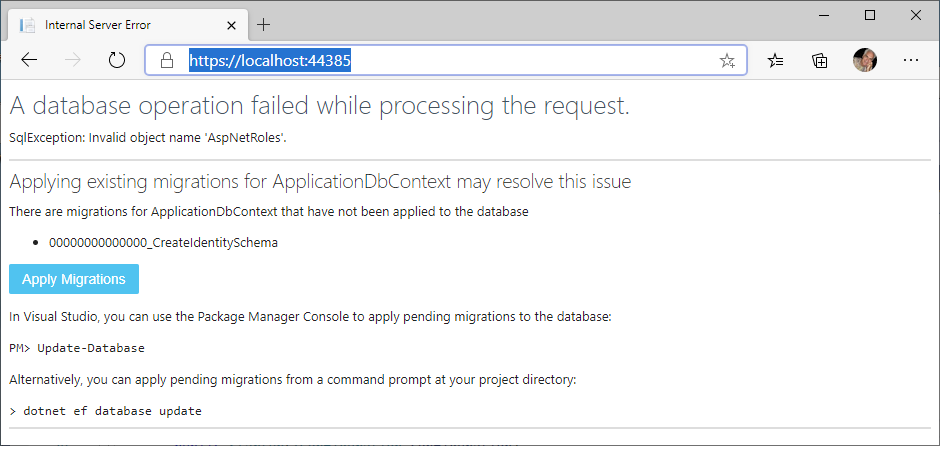 I tried deleting the Migrations folder folder and running run update-database -Context "ApplicationDbContext" from the Package Manager Console, but to no avail.

@bizcad - That is how it is supposed to work 👍 You just need to hit the "Apply Migrations" button to proceed.
Can you ensure that, in Visual Studio, you select .Net Core 3.1, not .NET 5, and follow the steps in the book: https://www.syncfusion.com/ebooks/blazor-succinctly (specifically this section).
This should guide you through the process of how this sample is supposed to work. Role based security must be enabled for the sample code to work.