

 AAChartModel
大佬,饼图如何自定义字体颜色,还有某些文字显示不出来。请看图和代码
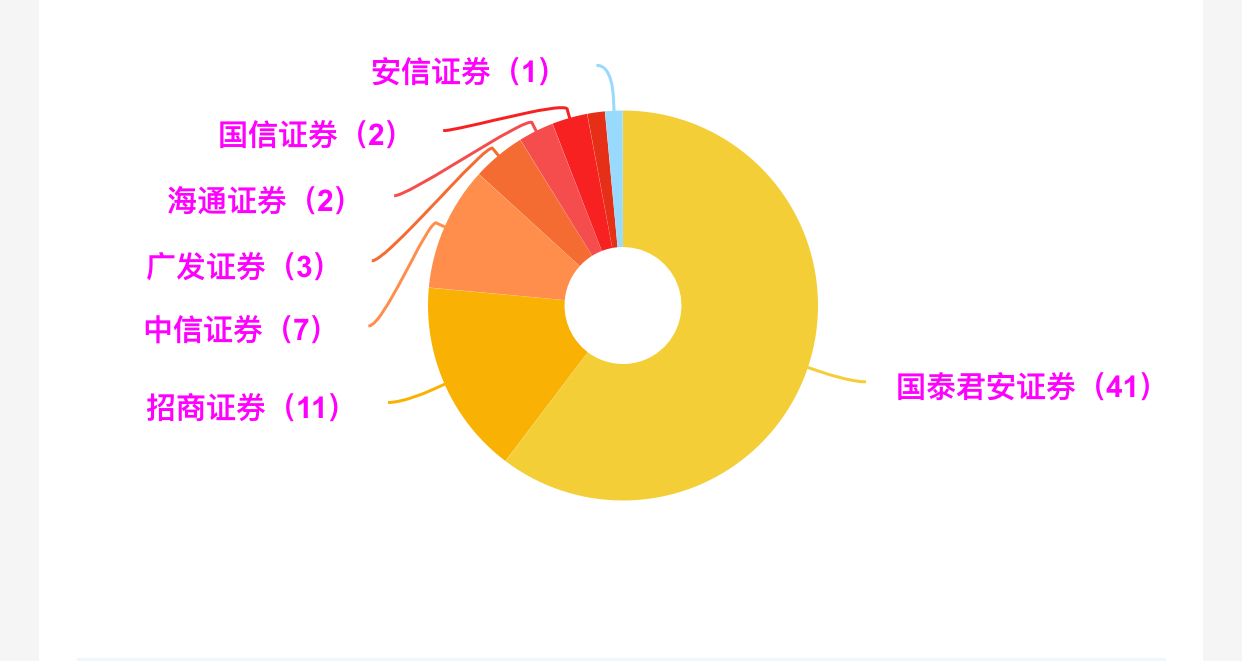 代码如下
:` AAChartModel *aaChartModel= AAChartModel.new
.chartTypeSet(AAChartTypePie)
.colorsThemeSet(colorArr)
.titleSet(@"")
.subtitleSet(@"")
.tooltipEnabledSet(NO)
.legendEnabledSet(NO)
.dataLabelsEnabledSet(YES)
.seriesSet(
@[
AAObject(AASeriesElement)
.nameSet(@"")
.innerSizeSet(@"30%")//内部圆环半径大小占比
.sizeSet(@130)//尺寸大小
.lineWidthSet(@1)
.borderWidthSet(@0)//描边的宽度
.allowPointSelectSet(NO)//是否允许在点击数据点标记(扇形图点击选中的块发生位移)
// .statesSet(@{@"hover":@{@"enabled": @(NO)}})//禁用点击区块之后出现的半透明遮罩层 (先定义bool变量的原因是,直接用true,false,处理完成之后容易变成0或者1。https://www.cnblogs.com/haojuncong/p/4652998.html )
.dataSet(titleArray)
.dataLabelsSet((AAObject(AADataLabels)
.enabledSet(YES)
.distanceSet(@15)
.formatSet(@"{point.name}")
.allowOverlapSet(NO)
.styleSet(AAObject(AAStyle)
.colorSet(@"#ff00ff")
.fontSizeSet(@"10px")
.fontWeightSet(AAChartFontWeightTypeRegular)
)
))
]
);
代码如下
:` AAChartModel *aaChartModel= AAChartModel.new
.chartTypeSet(AAChartTypePie)
.colorsThemeSet(colorArr)
.titleSet(@"")
.subtitleSet(@"")
.tooltipEnabledSet(NO)
.legendEnabledSet(NO)
.dataLabelsEnabledSet(YES)
.seriesSet(
@[
AAObject(AASeriesElement)
.nameSet(@"")
.innerSizeSet(@"30%")//内部圆环半径大小占比
.sizeSet(@130)//尺寸大小
.lineWidthSet(@1)
.borderWidthSet(@0)//描边的宽度
.allowPointSelectSet(NO)//是否允许在点击数据点标记(扇形图点击选中的块发生位移)
// .statesSet(@{@"hover":@{@"enabled": @(NO)}})//禁用点击区块之后出现的半透明遮罩层 (先定义bool变量的原因是,直接用true,false,处理完成之后容易变成0或者1。https://www.cnblogs.com/haojuncong/p/4652998.html )
.dataSet(titleArray)
.dataLabelsSet((AAObject(AADataLabels)
.enabledSet(YES)
.distanceSet(@15)
.formatSet(@"{point.name}")
.allowOverlapSet(NO)
.styleSet(AAObject(AAStyle)
.colorSet(@"#ff00ff")
.fontSizeSet(@"10px")
.fontWeightSet(AAChartFontWeightTypeRegular)
)
))
]
);
AAOptions *aaOptions = [AAOptionsConstructor configureChartOptionsWithAAChartModel:aaChartModel];
        aaOptions.plotOptions.pie.dataLabels.allowOverlap = NO;
[aaChartView aa_drawChartWithOptions:aaOptions];`
已设置了allowOverlap为NO,但顶部的深红色和蓝色文字没有显示出来,其中深红色的连线也没有,还有一个需求,是文字颜色能否跟随所属区域的颜色来设置,而不是使用dataLabels.style.color来统一设置某一颜色,我看连线已经可以跟随所属区域的颜色来自动设置。期待作者的回答
