AAChartKit

AAChartKit copied to clipboard
 AAChartModel
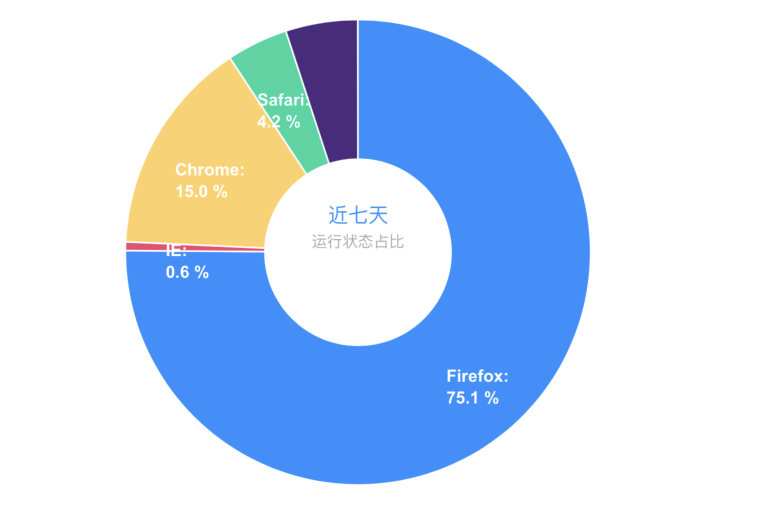
自定义饼图的标题和 DataLabels

Configure AAOptions
- (AAOptions *)adjustPieChartTitleAndDataLabelFontStyle2 {
AAOptions *aaOptions = AAOptions.new
.chartSet(AAChart.new.typeSet(AAChartTypePie))
.titleSet(AATitle.new
.useHTMLSet(true)
.textSet((@"<span style=""color:#1E90FF;font-weight:thin;font-size:13px"">    近七天 </span> <br> <span style=""color:#A9A9A9;font-weight:thin;font-size:10px""> 运行状态占比 </span>"))//标题文本内容
.alignSet(AAChartAlignTypeCenter)//标题水平居中
.verticalAlignSet(AAChartVerticalAlignTypeMiddle)//标题垂直居中
.ySet(@0)//标题相对于垂直对齐的偏移量,取值范围:图表的上边距(chart.spacingTop )到图表的下边距(chart.spacingBottom),可以是负值,单位是px。默认值和字体大小有关。
)
.colorsSet(@[@"#1e90ff",@"#ef476f",@"#ffd066",@"#04d69f",@"#4b2b7f",])//设置颜色主题
.legendSet(AALegend.new
.enabledSet(true)
.floatingSet(true)
.alignSet(AAChartAlignTypeRight)
.verticalAlignSet(AAChartVerticalAlignTypeTop)
.layoutSet(AAChartLayoutTypeVertical)
)
.tooltipSet(AATooltip.new
.enabledSet(true)
.styleSet(AAStyle.new
.colorSet(AAColor.whiteColor))
.backgroundColorSet(AAColor.blackColor))
.seriesSet(@[
AASeriesElement.new
.sizeSet(@300)//环形图的半径大小
.innerSizeSet(@"40%")//内部圆环半径大小占比
.allowPointSelectSet(false)//是否允许在点击数据点标记(扇形图点击选中的块发生位移)
.dataLabelsSet(AADataLabels.new
.enabledSet(true)
.useHTMLSet(true)
.colorSet(AAColor.whiteColor)
.distanceSet(@-40)//扇形图百分比线的长度
.formatSet(@"<b>{point.name}</b>: <br> {point.percentage:.1f} %")
)
.dataSet(@[
@[@"Firefox", @3336.2],
@[@"IE", @26.8],
@[@"Chrome", @666.8],
@[@"Safari", @188.5],
@[@"Others", @223.0],
]),
]);
return aaOptions;
}
Final Chart