
AAChartKit-Swift

AAChartKit-Swift copied to clipboard
 AAChartModel
今天更新了一下Pod,发现之前写的JS失效了!!!
更新前:

更新后:
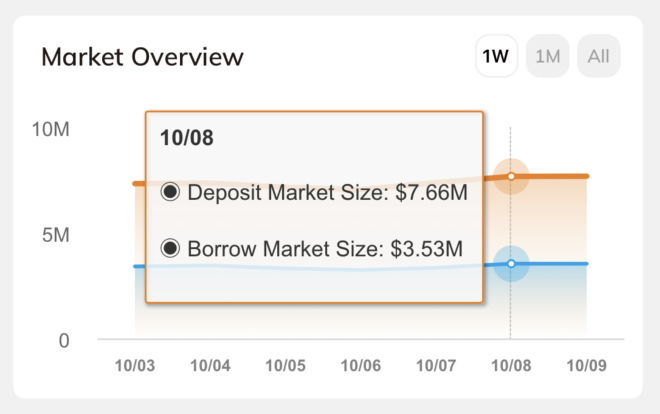
原先代码,未改动:
let js = #"""
            function () {
              let prefix = "%@";
              let selectedPoint1 = this.points[0];
              let selectedPoint2 = this.points[1];

              var number1 = selectedPoint1.y;
              if (selectedPoint1.y < 1000.0) {
                 number1 = (selectedPoint1.y).toFixed(2);
              } else if (selectedPoint1.y >= 1000.0 && selectedPoint1.y < 1000000.0) {
                 number1 = (selectedPoint1.y/1000.0).toFixed(2) + "K"
              } else if (selectedPoint1.y >= 1000000.0 && selectedPoint1.y < 1000000000.0) {
                 number1 = (selectedPoint1.y/1000000.0).toFixed(2) + "M"
              } else {
                 number1 = (selectedPoint1.y/1000000000.0).toFixed(2) + "B"
              }

              var number2 = selectedPoint2.y;
              if (selectedPoint2.y < 1000.0) {
                 number2 = (selectedPoint2.y).toFixed(2);
              } else if (selectedPoint2.y >= 1000.0 && selectedPoint2.y < 1000000.0) {
                 number2 = (selectedPoint2.y/1000.0).toFixed(2) + "K"
              } else if (selectedPoint2.y >= 1000000.0 && selectedPoint2.y < 1000000000.0) {
                 number2 = (selectedPoint2.y/1000000.0).toFixed(2) + "M"
              } else {
                 number2 = (selectedPoint2.y/1000000000.0).toFixed(2) + "B"
              }

              let wholeContentStr = `
              <style>
                .line-style{
                    font-size:10px;
                    color:#4e4d4f;
                    line-height:6px;
                    margin-bottom:-10px;
                }
                .line-style strong{
                    font-size:12px;
                    color:#231815;
                }
                .line-style .color-top {
                    color:${selectedPoint1.color};
                }
                .line-style .color-bottom {
                    color:${selectedPoint2.color};
                }
              </style>
              <div class="line-style">
                <strong>${this.x}</strong>
                <p><span class="color-top">◉ </span>${selectedPoint1.series.name}: <span class="color-top">${prefix}${number1}</span></p>
                <p><span class="color-bottom">◉ </span>${selectedPoint2.series.name}: <span class="color-bottom">${prefix}${number2}</span></p>
              </div>
              `;
              return wholeContentStr;
            }
            """#

let jsFormatterStr = String(format: js, "$")

aaOptions.tooltip?.useHTML(true).formatter(jsFormatterStr)
