

 71
71
Feature Request: Change Status Bar Color Based on Mode
As another "Visual cue to distinguish modes" (#13), I'd like to request the option to change the color of the status bar mode indicator based on the current mode.
E.G. snippet of the mode indicator colors from the vim airline theme, since I couldn't find any screenshot examples of mode color changes for the indicator in vscode offhand:
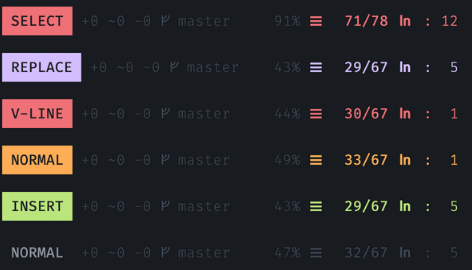
Requested Options:
- Color settings for the entire status bar based on mode.
- Color settings for the status bar's 'mode segment' alone, based on mode.
- Option to turn off changing color based on mode (current behavior).

- It is technically possible to implement this, but I'd rather not. Status bar color changes can only be implemented by updating VS Code preferences, which is slow, but more than anything will implicitly modify the user settings. It also doesn't play very nicely with built-in status bar color changes, e.g. when debugging. Note that you can already do this by adding a command to
dance.modes["..."].onEnterMode, e.g."dance.modes": { "insert": { "onEnterMode": [ [".run", { "input": "vscode.workspace.getConfiguration('workbench').update('colorCustomizations', { ...vscode.workspace.getConfiguration('workbench').inspect('colorCustomizations').globalValue, 'statusBar.background': '#ff0000' }, true, true)" }], ], }, "normal": { "onEnterMode": [ [".selections.restore", { "register": " ^", "try": true }], [".run", { "input": "vscode.workspace.getConfiguration('workbench').update('colorCustomizations', { ...vscode.workspace.getConfiguration('workbench').inspect('colorCustomizations').globalValue, 'statusBar.background': new vscode.ThemeColor('statusBarItem.errorBackground') }, true, true)" }], ], }, }, - I never thought about this, but this is once again very limited for extension developers: "Note: only the following colors are supported:
new ThemeColor('statusBarItem.errorBackground'),new ThemeColor('statusBarItem.warningBackground')".



I also came looking for this because this is one of the features I miss most about the Vim extension. I often forget what mode I'm in, so the changing colors really help me. Also, Vim has at least three colors that I've seen - red for Normal, green for Insert, and purple for Visual.

For anyone who is interested, I copied the exact colors from the VSCode Vim extension. Just copy these into your settings.json (after populating the default values from the Dance settings):
Insert
      "onEnterMode": [
        [
          ".run",
          {
            "input": "vscode.workspace.getConfiguration('workbench').update('colorCustomizations', { ...vscode.workspace.getConfiguration('workbench').inspect('colorCustomizations').globalValue, 'statusBar.background': '#5f0000' }, true, true)"
          }
        ]
      ]
Select
      "onEnterMode": [
        [
          ".run",
          {
            "input": "vscode.workspace.getConfiguration('workbench').update('colorCustomizations', { ...vscode.workspace.getConfiguration('workbench').inspect('colorCustomizations').globalValue, 'statusBar.background': '#5f00af' }, true, true)"
          }
        ]
      ]
Normal (onEnterMode already exists for this one, so put it inside that block)
        ,
        [
          ".run",
          {
            "input": "vscode.workspace.getConfiguration('workbench').update('colorCustomizations', { ...vscode.workspace.getConfiguration('workbench').inspect('colorCustomizations').globalValue, 'statusBar.background': '#005f5f' }, true, true)"
          }
        ]