

 4ian
4ian
Loss of focus when changing the value of an object variable at instance level in the properties panel
Regarding issue #3967
Even with the fix applied, we still have a two-digit problem.
https://user-images.githubusercontent.com/23488207/174446124-69056b87-dea3-4cfc-9c4c-e898faca5be7.mp4
If you try to change the object variable, for example, from 0 (default) to 11, for example, when typing the first character, it leaves focus and writes only one command, so the user must enter the field again and retype.

Hi @willianholtz,
This issue is due to #3967: we enforce to save variable name/value on each keyboard input so that, if you click on another instance, the name/value is correctly saved. I didn't realize that it would lose focus when modifying an object variable. I tried something to fix this: instantly refocus the field after the change is saved.
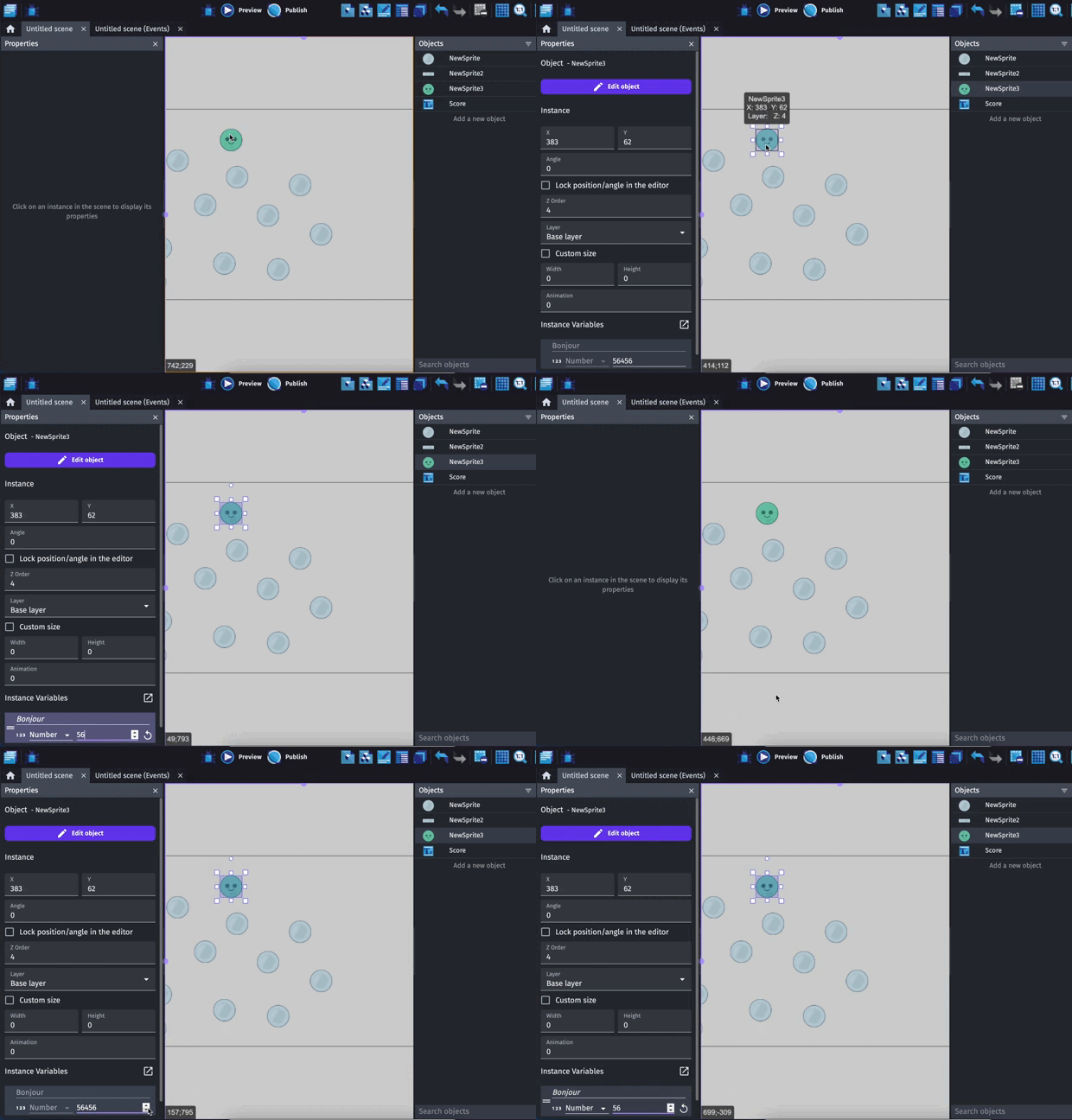
But you can see that when it focuses, the caret is set at the end of the input. This is quite unexpected I think and not really a good fix.
So I'm not sure how to carry on with this.

After modifying the default value, this problem no longer occurs. Note that when entering a value like default 0, changing it to 1, works normally (of course, it saves what it shouldn't), but when changing the default 0 to 11, as soon as we type the first number (this happens with strings too ) the same already saved. However, if the field has more than one character, this does not happen, and you can edit it at will.
I'm not sure I understand everything but here is what happens after a bit of investigation:
When you change the value of an object variable at the instance level, it creates the variable with the same name for the instance (not the object). When doing so, the field changes (going from disabled ID to italic ID, meaning that this instance variable will override the object variable) because it's not the same variable that it displays.
When the field changes, the focus is lost.
That is not really important when the variable editor is displayed in a dialog, but in the properties panel, it is different: as mentioned in #3967, when clicking on another instance on the editor, the panel is quickly changing from an instance to another and it doesn't leave us the time to save the changes. So we decided to save the changes at each key press.
That's why the loss of focus happens at the first character change.
Hello @AlexandreSi , I don't know if since the last conversation you were able to understand the problem. So I decided to make an example for you!
Download the project, and in the object, try typing a two-digit number, for example 10, or 11. And see what happens. This happens with Numbers and strings.
Thanks for the example.
I think it confirms my conclusion in https://github.com/4ian/GDevelop/issues/4048#issuecomment-1161388263.
There is no clear technical strategy to fix this and have #3967 fixed as the same time.
What we could do, as a UX hack is:
- Adding an edit icon on the right of the input.
- When clicking on it, it create the variable at the instance level
- Then you won't have issues changing the value of the variable.
Those hacks aren't good solutions. When the field change, we know that it will change and we also know which field it will be with with ID, a refocus on it is not feasible?

That's the idea of https://github.com/4ian/GDevelop/issues/4048#issuecomment-1160088942 But this way of fixing the initial problem might be reported as a bug as well
This bug is particularly annoying for instance variables that are Strings like name or id, where every time I go to update the instance variable I lose focus after typing the first character and then all the other characters are detected as potential hotkeys as the gui erupts in unexpected changes. So thank you for looking into fixing this issue.

I have no better idea than adding an Edit button to be able to edit the variable and removing the possibility to directly edit the variable (if it's inherited from the object) typing in the input.
Clicking the button will copy the object variable at the instance level. From then on, there won't be focus loss happening.
I have no better idea than adding an Edit button to be able to edit the variable and removing the possibility to directly edit the variable (if it's inherited from the object) typing in the input.
Clicking the button will copy the object variable at the instance level. From then on, there won't be focus loss happening.
To confirm, in this scenario users would still see the instance variables in the properties panel, and they'd basically be "read only" at first. Upon clicking the "edit" button (or maybe something like "Change Instance Variables"), that instances variables become editable from then on? No modal popups needed or anything.
Is the above accurate?

To confirm, in this scenario users would still see the instance variables in the properties panel, and they'd basically be "read only" at first. Upon clicking the "edit" button (or maybe something like "Change Instance Variables"), that instances variables become editable from then on? No modal popups needed or anything.
Is the above accurate?
Yes, that's what I have in mind. There would be an edit icon next to each object variable so that only this object variable is copied as an instance variable and the value input would be focused.
It’s better than the current behavior but still a bit cumbersome. Ideally the object variables order would be fixed (regardless of whether the value was inherited) and instance variable would be listed after object variables in the instance properties panel. Therefore there would be no need to reorder the variable when you modify the object level variables for an instance. But I understand it’s complicated to mange focus the way it’s designed.
!Lee
On Jul 26, 2022, at 9:47 AM, AlexandreS @.***> wrote:
To confirm, in this scenario users would still see the instance variables in the properties panel, and they'd basically be "read only" at first. Upon clicking the "edit" button (or maybe something like "Change Instance Variables"), that instances variables become editable from then on? No modal popups needed or anything.
Is the above accurate?
Yes, that's what I have in mind. There would be an edit icon next to each object variable so that only this object variable is copied as an instance variable and the value input would be focused.
— Reply to this email directly, view it on GitHub, or unsubscribe. You are receiving this because you commented.
I just experienced this issue myself. I'm not across the previous issue that caused this, or the technical implications of fixing it, but is it not possible to simply allow typing any number of characters, then saving/committing them when the field loses focus (e.g. you click off on something else)?

I just experienced this issue myself. I'm not across the previous issue that caused this, or the technical implications of fixing it, but is it not possible to simply allow typing any number of characters, then saving/committing them when the field loses focus (e.g. you click off on something else)?
Unfortunately we cannot do that, as mentionned in https://github.com/4ian/GDevelop/issues/3967#issuecomment-1140467125.
If someone selects another instance on the scene, the selectedInstance is instantly changed, before the field has even the time to trigger its blur callback.