

 2mas
2mas
Statement completion/Intellisense multiple insert
Installed product versions
- Visual Studio Community
- This extension: 1.2.8
Description
I would prefer the statement completion to work with multiple edits, so far I have not come up with a good solution for this, so help is appreciated
Steps to recreate
- Select multiple selections
- Trigger an intellisense dialog and make a selection
Current behavior
The completion will only be inserted into the last selection (popup closes too fast too)

Expected behavior
Same completion on all occurrences


Thanks @Alx101, I'd need an implementation to work with, not sure how to hook into that. Welcome with PR
This is a constant frustration for me, coming from MixEdit. Not sure how they implemented it but the plugin is seemingly nowhere to be found anymore.
I think the basic idea would just be to take the new insert text from the CompletionSet.OnCommit field out completeWord and just add it to all other cursors. It seems safe to assume that the user does not actually want intellisense to run for each cursor and that the string insertion from the main cursor should just be replicated to the rest.

It seems safe to assume that the user does not actually want intellisense to run for each cursor and that the string insertion from the main cursor should just be replicated to the rest.
Agreed. It's hard to think of a better alternative to just replicating the completion to all carets.

Hi! Yes the basic idea is not what troubles me with this if I could actuallt get a commit-representation with text to be inserted and what has been typed so far. It's how to actually get a hold of an implementation or similar, like an event to subscribe to when intellisense has been committed. Committing could be done with mouseclicks aswell from the list, so there should be an event to subscribe to or an interface to implement and/or an export to register to get access to a commit from VS.
If you have some time to dig into this, some fresh eyes might do the trick, welcome with PR. It might be easy, I just dont know how to proceed :)
Would be awesome if we could solve this one, it bugs me too.
I almost had some success by importing the ICompletionBroker when exporting the ViewCreationListener as IVsTextViewCreationListener (this didnt work without changing the export, since the commands to the intellisense-dialog couldn't get intercepted), but could not get it to work well I'm afraid, too much hacks and it's just not reliable and would cause even more annoyance if deployed.
What I ran into with this approach is basically:
-
When inserting edits on other points than the active point that triggered the IntelliSense-dialog, the dialog will be dismissed immediately. Meaning if we are editing in places where IntelliSense would be active, we cant do that on multiple lines to keep the dialog open. The other way is to only do edits on the active line while IntelliSense is active, and then watch the Dismissed-event and figure out if it has been committed or not. If not, we would have to insert the same chars on the rest of the lines after the dialog has been dismissed. Easy to get this wrong or not be able to retrieve the correct chars.
-
If a commit was made, The ICompletionSession.Commit() does not actually insert the text of: Completion.InsertionText. For example
Cast<>would insertCast. Would have to consider this for several languages too, if manually inserting this to multiple lines.
Atleast this can be a slight improvement to autocomplete (Edit.CompleteWord/Ctrl+Space) on multiple lines independently, only works when there is just one option and the dialog doesnt open, I had missed to process this command over multiple lines in the released version:
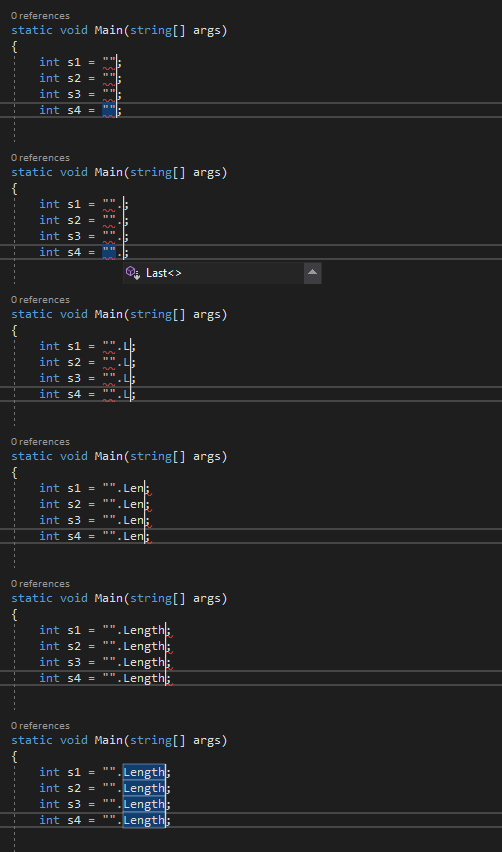
Edit: This doesnt help if using IntelliCode, because then the IntelliSense-list is always populated.