

 1Remote
USB redirection
Hello, is it possible to add the feature to redirect the USB devices to the remote host? I've selected the "port" flag on the options tab of the connection but I'm not able to see the "Select device to use" button as in Microsoft RD client

Thank you so much, your software is working very well :)
A

wooah sorry I didn't realize it doesn't support usb redirection, I will find out the solution.
it seems that the mstsc librariy offering by Microsoft, did not offer a special option for usb redirection, it must be hiding somewhere.


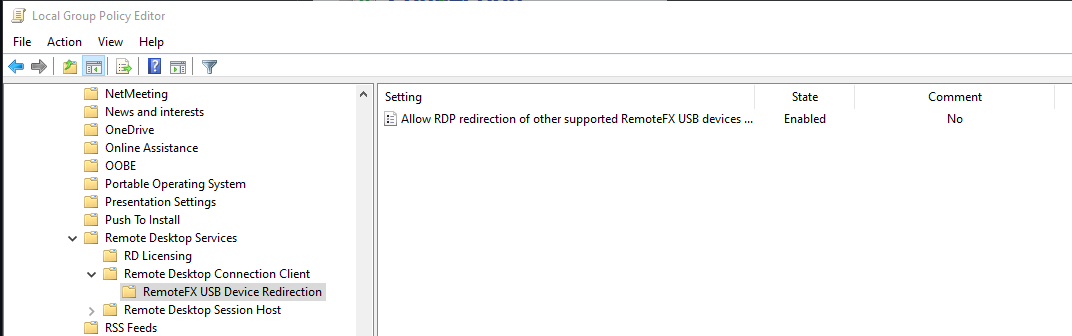
for your info it is called "RemoteFX USB Device Redirection" and has to be enabled in client and host via gpedit
I developed a beta version and can redirect my USB flash drive. Now it only need to check the "Disk Drives" then the USB flash drive will be redirected. Since I only have a USB flash drive on hand now, I cannot test whether other USB devices(like a camera https://github.com/mRemoteNG/mRemoteNG/issues/1951) are working properly.
If you have other USB devices, please help me to test. PRemoteM 0.5.10.3-beta.zip

And I am still looking for how to show this “devices button” on the connection bar : (, I cannot find anything about how to show this button.
https://docs.microsoft.com/en-us/windows/win32/termserv/imstscaxevents-ondevicesbuttonpressed

@nicobo01 err,sorry but I don't understand why your anti-virus software misreported.My package was compiled directly through msbuild, and it shouldn't be misreported(IMO). I don't know the knowledge of anti-virus, so I can't analyze the reason.
BTW, I use windows defender only, and it gets along well with my application.
@nicobo01 Are all the packages(https://github.com/VShawn/PRemoteM/releases) are detected as ransomware, or only this version(PRemoteM 0.5.10.3-beta.zip) is reported as a virus?
in this version I added a subscription to the USB device unplugging event, it may be that this place caused the virus misreported.
Hello @VShawn
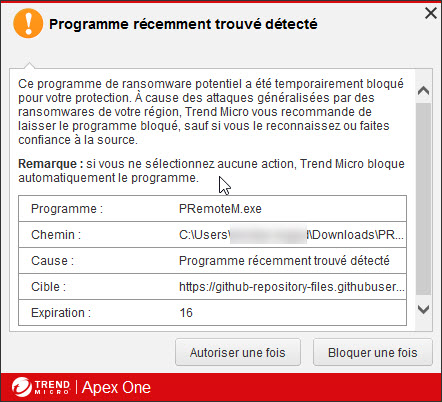
My antivirus is Trend Micro Apex-One. This detects PRemoteM.exe as a potential ransomware. I did not test with another version of the software. The offending one is the PRemoteM.0.5.10.3-beta version.
 ,
,
I developed a beta version and can redirect my USB flash drive. Now it only need to check the "Disk Drives" then the USB flash drive will be redirected. Since I only have a USB flash drive on hand now, I cannot test whether other USB devices(like a camera mRemoteNG/mRemoteNG#1951) are working properly.
If you have other USB devices, please help me to test. PRemoteM 0.5.10.3-beta.zip
The actual beta doesnt do the job, usb devices are not redirected.
And I am still looking for how to show this “devices button” on the connection bar : (, I cannot find anything about how to show this button.
https://docs.microsoft.com/en-us/windows/win32/termserv/imstscaxevents-ondevicesbuttonpressed
I've seen the mremoteng is showing the icon but doesnt work (click on it doesnt show the selection panel)
Ciao
@imsonica
The actual beta doesnt do the job, usb devices are not redirected.
usb devices redirect only in tab view, rdp with full screen will not work, it is a bug i fixed 11 hours ago https://github.com/VShawn/PRemoteM/commit/771b0f6051e770189b4338abe6c6af9a91a1de44. do you test in full-screen mode? and Is your USB device a USB flash drive?
@imsonica
The actual beta doesnt do the job, usb devices are not redirected.
usb devices redirect only in tab view, rdp with full screen will not work, it is a bug i fixed 11 hours ago 771b0f6. do you test in full-screen mode? and Is your USB device a USB flash drive?
I'll try another test, I'm not sure I can redirect usb since my company policies. I tested and I would like to redirect usb HID devices like spacemouce. I did the test in full screen, I'll try again as you said.
Thank you for your help, but according to your description, I feel that my previous work cannot fit your needs. And what's more regrettable is that when I don't have a spacemouce, I can't debug this function at all.
Thank you for your help, but according to your description, I feel that my previous work cannot fit your needs. And what's more regrettable is that when I don't have a spacemouce, I can't debug this function at all.
In the list of RemoteFX also webcams or usb headsets appear, you could debug using these kind of devices.
If you have other USB devices, please help me to test. PRemoteM 0.5.10.3-beta.zip
I can't see a difference - v0.5.10.2 already shows USB drive as remote drive. I can't see any new local drive in both versions.

@majkinetor
I can't see a difference - v0.5.10.2 already shows USB drive as remote drive. I can't see any new local drive in both versions.
The older version cannot update the device redirection when you insert or remove the USB flash drive.
see:
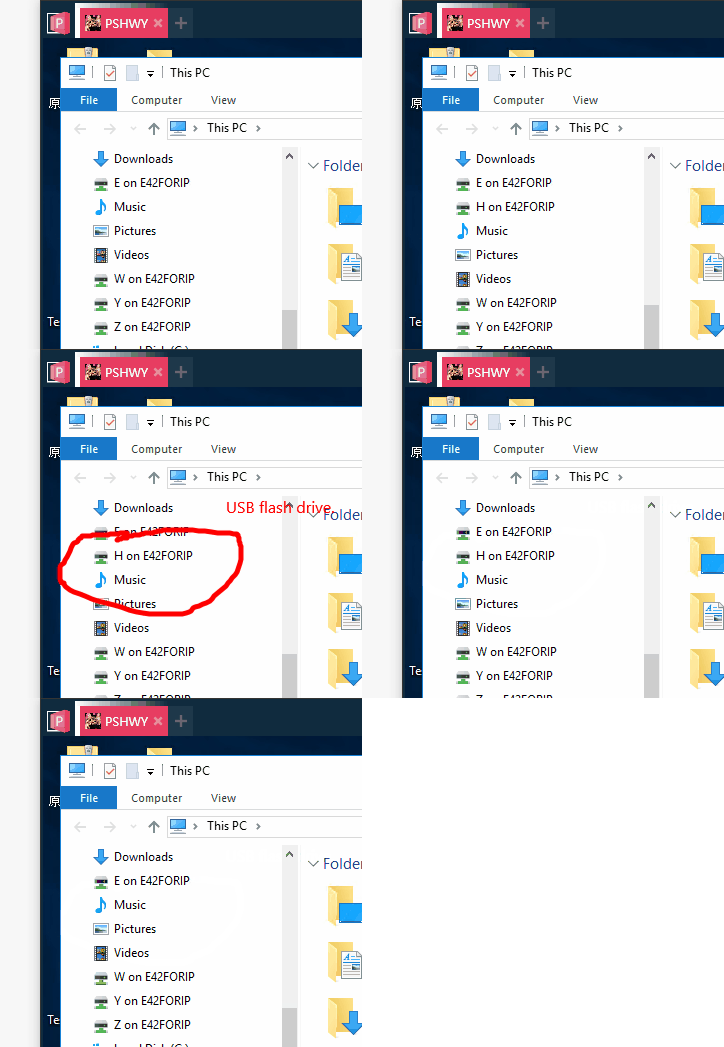
No, it doesn't work for me. It shows under 'Redirected drives', but that worked on old version. Tried 2 different USB drives and 2 different Windows remote OS.
Hi, I saw this comment and gave it a try. Feature Request: Using local devices in Remote session · Issue #1951 · mRemoteNG/mRemoteNG
Downloaded PRemoteM 0.5.10.3-beta.zip Extracted it to C:\usr\pRemoteM And launched PRemoteM.exe ...Nothing happened. No window was opened, no error message was given.
My system is: x64 Windows 10 Pro 20H2; no security software except Windows security. Microsoft Defender reported no current threats.

@itagagaki
こんにちは 板垣さん
I dont konw what happen on you, but you can try this to help me.
- could you please check your
C:\Users\ * YOUR USER NAME * \AppData\Roaming\PRemoteMand see if there are any log files. - try our store version to see if it can be opened: https://www.microsoft.com/store/productId/9PNMNF92JNFP
@VShawn
This is the log. The message is in Japanese, but it may help you. PRemoteM.log.md.zip
The store version 0.5.10.2 worked fine.
@itagagaki Thanks for your log. It looks like a error caused by character encoding or reflection from the log message. so I delete some plugin dll for you, it may works:
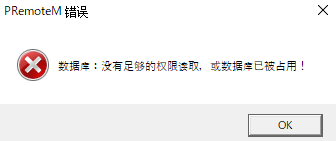
Beta2 didn't work either but I found out that one of the reasons it didn't work was because of the zone identifiers, so I unblocked them and tried to run it, and got a Chinese error dialog. I do not understand what it says..
And here's the log.
2021-05-11T21:00:45.3654588+09:00[ThreadId:0000000001] Debug Call HideMe()
2021-05-11T21:00:48.6565077+09:00[ThreadId:0000000001] Debug Call HideMe()
2021-05-11T21:00:50.0570413+09:00[ThreadId:0000000001] Debug Call HideMe()
2021-05-11T21:00:58.4890007+09:00[ThreadId:0000000004] Debug Check update.
@itagagaki it said It does not have permission to read the database, or the database is already occupied.
The error message was decided to be Chinese by environment judgement, It seems that my program is still not able to adapt to the Japanese system environment. 😞
BTW database path can be modified in the PRemoteM.ini
Okay, I was able to launch 0.5.10.3 beta.
I'll finally get to the point. How can I test the redirection of cameras and other USB devices?
I checked all of the "Resources" for now, but unfortunately the remote PC doesn't find the camera.
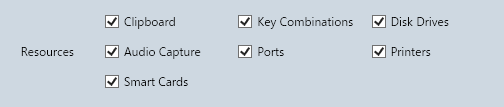
@itagagaki this means usb redirection not works for usb cameras. It seems that I have to buy a usb camera📷 to debug this.
BTW did you test usb flash drive? did it works?
I have to buy a usb camera📷 to debug this.
I believe modern smart phones are the same with their camera mode of usb transfer.
No, that is not it, previously it showed as remote drive (from the host) while it should show as local drive.
Ah, I see. Yes, it showed up as a remote drive, but not as a local drive.
I developed a beta version and can redirect my USB flash drive. Now it only need to check the "Disk Drives" then the USB flash drive will be redirected. Since I only have a USB flash drive on hand now, I cannot test whether other USB devices(like a camera mRemoteNG/mRemoteNG#1951) are working properly.
If you have other USB devices, please help me to test. PRemoteM 0.5.10.3-beta.zip
And I am still looking for how to show this “devices button” on the connection bar : (, I cannot find anything about how to show this button.
https://docs.microsoft.com/en-us/windows/win32/termserv/imstscaxevents-ondevicesbuttonpressed
I found this one in pt https://www.ti-enxame.com/pt/window/como-habilitar-o-redirecionamento-usb-no-windows-10/1056392685/
these others who can also help https://stackoverflow.com/questions/33719489/how-to-enable-usb-redirection-in-windows-10
https://social.technet.microsoft.com/Forums/en-US/dd35353f-6056-4249-aaeb-57c6ab2588ae/usb-redirectionremotefx-windows-10-enterprise?forum=win10itprogeneral

I have been trying to get a USB footpedal to work over RDP with no luck. It will work to the same server when I use a Linux client (Remmina) but not on my Windows 10. I have enabled all of the Advantage / Resources but the foot pedal does not show up. Is there anything I can do it get this working?
